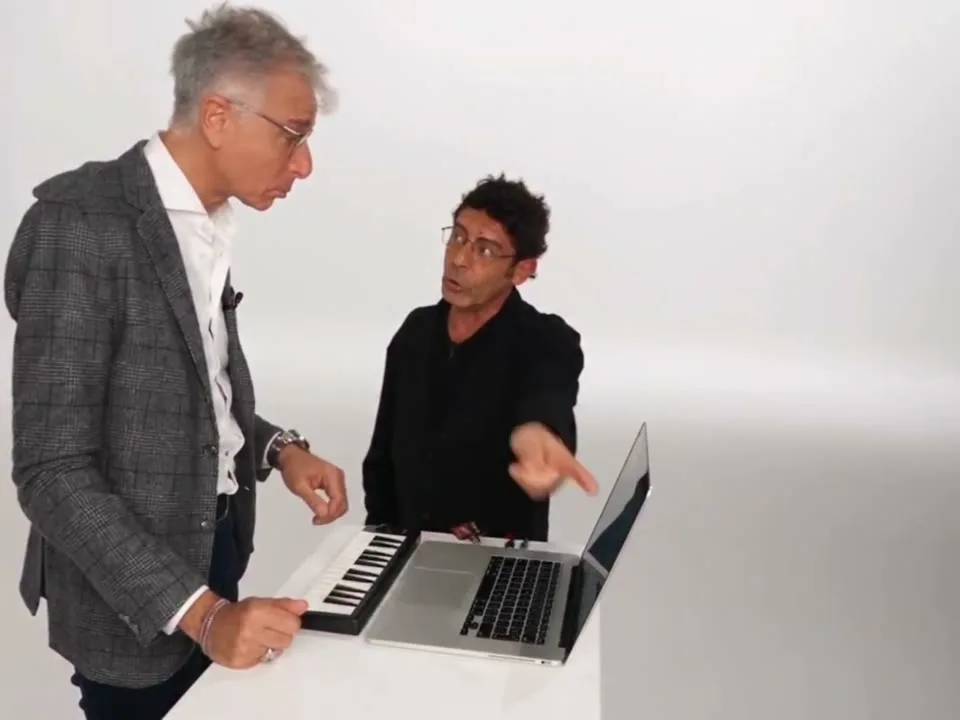
Copy a role-aware prompt for Seedance, Gemini with Flow, Genjutsu, Kling, or another video model. The key is not the keyword list. It is keeping the workstation host and the visitor in the right order.
Role map
The template is a two-person interaction. Name the roles before the model sees the faces, or the identities will drift between the close-ups.
Stromae / workstationThe person at the keyboard and laptop. This is the first uploaded photo and reference Image 1.
Jamel / visitorThe person reacting beside the desk. This is the second uploaded photo and reference Image 2.
Seedance 2 / ToAPIs
Two-role reference video prompt
Create a 12-second studio video based on the motion, cuts, and gestures in reference video 1. Keep the white studio, keyboard, laptop, desk, camera moves, and editing rhythm.

Image 1 replaces the workstation host, the person in the gray suit at the keyboard and laptop.
Image 2 replaces the visitor, the person standing beside the workstation.

Do not swap the identities. Keep each person's face, hair, glasses, facial hair, skin tone, and clothing from their own reference image. Keep the body shape, height, role, gestures, and timing from the source video. The workstation host continues to control the keyboard and laptop. The visitor continues to react, point, dance, and stand beside the desk.

Keep the scene bright and minimal. Do not add furniture, extra people, captions, logos, watermarks, dark lighting, or a new camera style.
Use this when the model accepts both a source video and two reference images. Keep the workstation photo first so the role order stays stable.
Gemini 3 / Flow
Storyboard prompt for Gemini
You are planning a 12-second two-person studio video inspired by the "Alors on Danse" workstation trend.

The set is a seamless white studio with a small desk, a black keyboard, and a silver laptop.
Role A is the workstation host. Role B is the standing visitor.

Write 7 short shots in order:
1. A wide two-person establishing shot.
2. The host operating the keyboard and laptop.
3. A quick reaction close-up of the visitor.
4. A medium shot where the visitor points toward the workstation.
5. A close-up of both faces looking toward each other.
6. A movement beat where both people dance or gesture beside the desk.
7. A final wide studio shot with both people in frame.

For every shot, include framing, action, expression, and one continuity note for the white studio and the two fixed roles. Do not add props or change the setting.
Use Gemini to break the trend into shots, then send the shot descriptions to an image-to-video model in Flow or another video tool.
Genjutsu / Kling
Genjutsu or Kling role prompt
Two-person face replacement in a bright white photography studio.

Character A: the workstation host. Use the first uploaded portrait for this person. They stand at the keyboard and laptop and keep the gray-suit role's body position and gestures.
Character B: the visitor. Use the second uploaded portrait for this person. They stand beside the workstation and keep the visitor's reactions, pointing, and dance movements.

The source action, camera cuts, desk, keyboard, laptop, and white background must stay unchanged. Match identities only to their assigned roles. Do not cross faces. No extra people, text, watermarks, or scene changes.
This version spells out the role mapping in English because several image-to-video interfaces handle named characters more reliably than array positions alone.
General image-to-video
Single-image fallback prompt
Photorealistic wide shot inside a seamless white studio. Two people stand beside a small desk with a black keyboard and a silver laptop. The person on the left is the workstation host and operates the keyboard. The person on the right is the visitor and reacts beside the desk. Both face the camera with a playful advertising-video energy.

Clean commercial lighting, crisp focus, white floor, no props beyond the desk and equipment. Leave room around both people for a vertical crop. Do not add captions, logos, extra furniture, or a dark background.
Use this only when the tool cannot accept a source video. Generate the studio scene first, then animate the still with subtle camera motion and gestures.
Prompt rules that matter most
Describe the two roles before describing the faces.
Keep the body, height, pose, and gestures from the source clip.
Lock the white studio, keyboard, laptop, desk, and camera cuts.
Repeat the role mapping in the closing sentence.
Use a short fallback prompt when the tool accepts only one image.
If you would rather skip the prompt work, the generator on the home page already contains the production version.
Does the generator need an Alors on Danse AI prompt?
No. The website already uses a production prompt. The prompt library is for users who want to reproduce the look in another model or understand the role mapping.
Which reference image comes first?
The workstation host comes first. The visitor comes second. That order matches Image 1 and Image 2 in the production prompt and keeps the two roles from swapping.
Why mention Stromae and Jamel in the role names?
The labels describe the familiar viral format. Stromae is used for the workstation role and Jamel for the reacting visitor role. The website is independent and not affiliated with either artist.
Can I copy these prompts into any video tool?
Yes, but not every tool accepts a source video with two reference images. If a model supports only one image, use the fallback prompt and accept that identity consistency will be weaker.